In the Playstation 1 / Nintendo 64 era, it was a common practice to pair low-poly 3D models with prerendered photo-realistic 2D backgrounds to give the illusion of a fully 3D-rendered game. This technique was used extensively in the Resident Evil series and Squaresoft RPGs (Final Fantasy 7, 8 and 9 and Chrono Cross), and when we emulate those games, we run into some issues related to the background.
If we use an emulator that supports increased internal resolution, the 3D polygon elements look sharp and crispy but the prerendered scenes are super-pixelated, and the contrast between the two can be jarring and distracting:
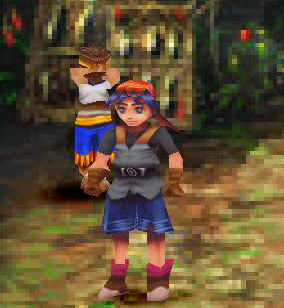 |
| An unsettling juxtaposition. |
To avoid that, you can stick to the native resolution and let everything look consistently pixelated and then use a full-screen post-processing shader remove some of the rough edges. Unfortunately, many of the algorithms we use for upscaling representational, cartoony pixel art don't always do a good job with the prerendered scenes, as the subtle gradients and natural, random dithering can trip up the pixel comparison and pattern detection methods that work so well in other applications:
 |
| Only a few pixels get smoothed; most are skipped |
There are some good upscaling algorithms that are designed to deal with this sort of application, though, and we'll take a look at some of the ones available in shader form. We'll be comparing 4x upscales from two native-res captures from Final Fantasy 7:
ScaleFX-Hybrid
Sp00kyFox's scaleFX algorithm does a stellar job on cartoony stuff, and he tweaked the algorithm a bit to better handle small details. It has a
rough, stipple texture on edges, unlike the
regular version, and maintains details that the regular version smooths away:
It also handles gradients better than the regular scalefx, with reduced posterization.
NNEDI3
This algorithm, which utilizes a "predictor neural network architecture and local neighborhood pre-processing" (whatever that means), was recently ported to RetroArch's slang shader format by a fellow that goes by the name ZironZ. He hardcoded the huge swaths of weights derived from the neural network into the shader passes, which makes for relatively long compile times but respectable speeds once the task is done. He provides a handful of presets, some of which are much too demanding for my modest GPUs, but the basic preset runs in real-time and looks very nice:
This algorithm compares well with the popular
waifu2x algorithm, which is also neural net-based but cannot run anywhere close to real-time (these shots are using the 'photo' preset with 'medium' denoising):
 |
| waifu2x, photo, medium denoise; no shader form available |
 |
| waifu2x, photo, medium denoise; no shader form available |
While all upscalers have a "signature" in the way their output looks (characteristic swirls or burrs on objects, etc.), much of waifu2x's magic mojo comes from its denoising routine, which gives images a surreal, painterly look when maxed out:
 |
| waifu2x, photo, max denoise; no shader form available |
 |
| waifu2x, photo, max denoise; no shader form available |
We can't reproduce that look exactly with real-time shaders, but we can get closer by adding a pre-pass of bilateral blur, which denoises the image by blending neighboring pixels that are close in color/intensity.
Fast-bilateral-NEDI
This combines Xin Li et al's NEDI algorithm (not to be confused with the aforementioned NNEDI3 from tritical) with a fast-bilateral pre-pass to get some of that smooth, surreal look at the cost of lost detail:
The fast-bilateral shader includes a runtime parameter to control the strength of the blending, and I modified it to go all the way up to 2.0 (default value is 0.4 with a max of 1.0), which looks nice but nearly wipes out the tile mosaic:
Fast-bilateral-super-xBR
Hyllian's xBR algorithm is now legendary in emulation circles for its ability to upscale pixel art, and the super-xBR variant is tuned to handle images and photos. The pre-pass of fast-bilateral cleans up some of the images' own built-in noise:
Again, cranking up the bilateral-blur to to 2.0 has an interesting if not useful effect:
And, just for fun/comparison, here's what waifu2x looks like in "artwork" mode (that is, a mode that throws away even more detail) with the denoising at maximum:
 |
| waifu2x, artwork, max denoise; no shader available |
 |
| waifu2x, artwork, max denoise; no shader available |
Hyllian's 3D detection shaders
Another alternative strategy involves using an initial shader pass to identify which elements are upscaled 3D models vs which ones are 2D textures. This lets the shader work on HUD elements and backgrounds without getting thrown off by the increased internal resolution:
 |
| super-2xbr-3d-6p-smoother (I think) |
 |
| jinc2-sharper-3d (I think) |